


The promise of a desktop experience from your phone often ran into the brick wall of reality.
Imagine you could carry your entire office in your pocket. You sit at a desk, plug your phone into a monitor, and suddenly, a full desktop operating system appears. This was the pitch for Samsung DeX and Microsoft Continuum. These technologies promised to bridge the gap between our mobile devices and our workstations. They suggested we could stop buying laptops and just use our phones for everything. Despite all the engineering effort, they never became a common way to work.
Samsung DeX and Microsoft Continuum aimed to turn a phone into a PC. On paper, it was brilliant. You take your phone, connect it to a screen, mouse, and keyboard, and you get a desktop interface. It seemed like the perfect solution for anyone who wanted to do more work on the go without carrying a laptop. Yet, this vision failed to reach most people. While the tech worked, it did not solve the problems people actually had.
The Technical Hurdles: Power, Peripherals, and Practicality
The hardware setup required to make these systems work was a major blocker. You could not just plug your phone into a monitor and start working. You needed a specialized dock, a monitor, a mouse, and a keyboard. By the time you bought all these extra parts, you had spent almost as much as you would on a cheap, functional laptop. The value proposition simply was not there for the average user.
Performance Bottlenecks and Software Incompatibility
Even the best mobile phones have limits. They are designed for battery life and mobile apps, not heavy desktop tasks. When you pushed these devices to handle multitasking in a desktop view, they often slowed down. You might experience stuttering, lag, or even random reboots when running several windows at once. The experience was never quite as smooth as a real desktop computer, because the chips in phones are not built to sustain that kind of load.
The “Dongle Life” Frustration
The physical act of setting up was a nightmare for most people. If you wanted to use your phone as a desktop at home and at the office, you needed a dock in both places. You had to connect cables, manage peripherals, and untangle a mess of wires every time you sat down. This constant cycle of plugging and unplugging became known as “dongle fatigue.” Most people decided it was easier to just open a laptop than to deal with the friction of this setup.
User Experience Flaws: Where Desktop Met Mobile Expectations
The biggest issue with Samsung DeX and Microsoft Continuum was the software. Mobile apps are built for touch screens, not for mice and keyboards. They are designed for small screens and quick interactions. When you force these apps to work in a desktop window, they often break or behave in weird ways. The menus might not respond correctly, the windows might not resize, and the keyboard shortcuts often failed entirely.
Lack of Native Desktop Application Support
Professional work requires professional software. When you switched to a phone-based desktop, you lost the full versions of apps like Microsoft Office, Adobe Creative Cloud, or specialized coding tools. You were stuck with stripped-down mobile versions that lacked features. For anyone who actually needed a desktop computer to get work done, this was a massive limitation. It turned the phone into a tool for checking email or browsing, not for creating or managing complex projects.
Navigational Inconsistencies and Input Mismatch
Using a mouse to click through a mobile interface feels wrong. Mobile OS design relies on swipes, pinches, and long presses. Desktop design relies on precise pointer movement, right-clicks, and window management. The translation between these two interaction models was rarely smooth. Users found themselves fighting the interface rather than getting work done.
Ecosystem Fragmentation and Limited App Optimization
Developers did not see a reason to rebuild their apps for a niche feature on a few phone models. Because app optimization was left up to the developers, most apps never received the updates needed to work well in a desktop mode. This meant that even if the hardware could handle the work, the software simply refused to cooperate.
Market Strategy Missteps and Positioning Errors
Who were these features for? The manufacturers never seemed to know. They tried to sell these tools to power users, but power users already owned powerful laptops. They tried to sell them to casual users, but casual users found the setup too complex. This confusion meant the marketing messages never hit home. Most people did not see the need for a secondary desktop experience if they already had a computer.
Competitive Landscape Undercutting the Proposition
The market offered better alternatives. Chromebooks, for example, appeared right around the same time. These were cheap, dedicated devices that did exactly what people needed: browse the web, write documents, and send emails. They were ready to use, affordable, and came with a keyboard and screen included. It was much easier to buy a Chromebook than to build a phone-based desktop rig.
Lack of Long-Term Commitment and Consistency
Microsoft eventually gave up on the mobile desktop concept, killing off Continuum entirely. Samsung kept DeX, but it stayed a niche feature for their phones. Because the industry did not fully back the idea, businesses were afraid to adopt it. Companies do not want to base their workflows on a feature that might disappear in a year. This lack of certainty killed any hope of enterprise adoption.
The Inevitable Rise of True Cloud and Thin Client Solutions
Technology eventually moved in a different direction. Today, you do not need the phone to be the computer. You just need the phone to be a secure terminal. With modern remote desktop tools, you can access your powerful work computer from your phone, tablet, or a cheap browser-based machine. The processing power happens in the cloud, not on your device. This is a much more practical way to achieve the goal of working from anywhere.
Chromebooks as the Unintended Desktop Killer
Chromebooks won the battle for the low-cost desktop market. They are simple, they are fast, and they work right out of the box. They do not require a docking station or specialized apps. They use web apps that just work. This simplicity is what the public wanted all along. DeX and Continuum were trying to be too clever by forcing a phone to act like a PC, while Chromebooks just gave people a simple, functional computer.
Conclusion
The failure of Samsung DeX and Microsoft Continuum is a lesson in understanding what users actually want. The idea of convergence sounds great, but it failed because it created more friction than it removed. A phone is designed to be a phone—mobile, fast, and always in your pocket. A desktop is designed for long hours of focused work on a large screen. Trying to cram the desktop experience into the mobile experience created a product that did neither job well.
Future attempts at hardware convergence need to focus on simplicity. If you want people to change their habits, the new solution must be easier, not harder, to use. The failure of these systems proved that portability and productivity require different tools, and most people are happy to keep them separate.
NexPhone
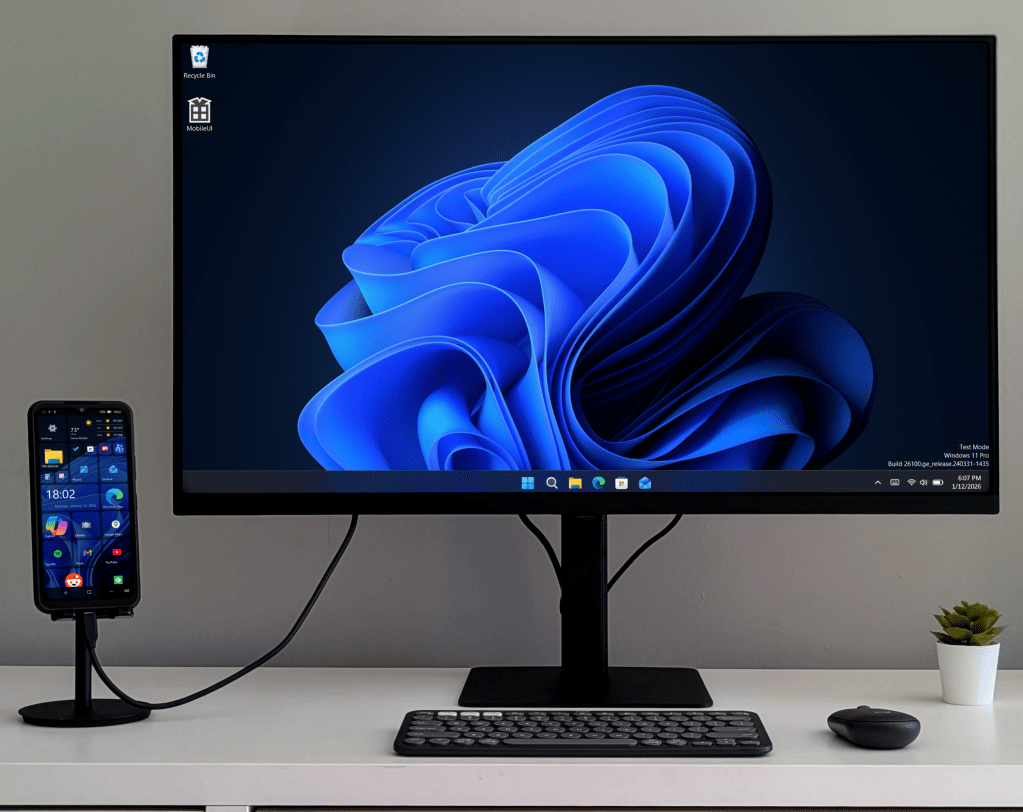
Nex Computer LLC is expected to bring the NexPhone to market by Q3 2026, if possible. It is planned to run several operating systems; Windows 11 with a mobile (touch) interface developed by Nex in house, Android with Desktop, and (at least initially) a Debian, or Debian derived Linux operating system. Windows 11 is claimed to be compatible with the currently selected Qualcomm QCM6490 Processor and other specifications of the, quite rugged handheld.
NexPhone is the next logical step for this company. NexDock has been providing laptop capability for competing handhelds since 2016. Now Nex has the total package, making the phone now, too.
The long term availability of the processor promised by Qualcomm could make a long software support tail for the operating systems likely. Some netzines are skeptical, though. NexPhone is proud of there small and focused team. Even if they could support Linux/GNU & Linux/Android on there own, they are completely relying on Microsoft to maintain Windows support. Microsoft’s recent track record isn’t promising either. Although, the lack of competition beyond say, Fairphone, may lead to a better than nothing cohort of adopters. Especially among tech enthusiasts.
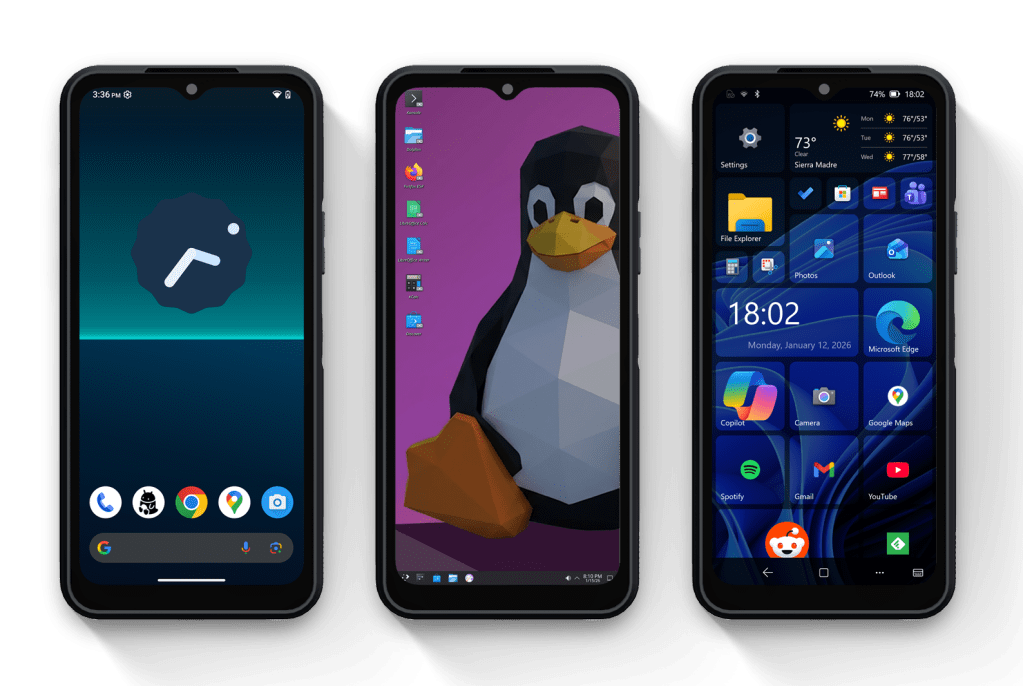
The question is, with there be an eager flock of buyers once it comes to market. If you are one of the eager, look at their website for more information including full specifications and pricing. As of writing a deposit of $199 in the U.S. lets you lock in a $549 purchase price.


Leave a Reply